Offset Rim Calculator (Wheel Offset and Backspacing)
Convert wheel offset to backspacing, or compare your current and new wheel to see how far the rim and tire move in and out.
This offset rim calculator works out where a wheel’s mounting face sits relative to its centreline, and where the inner and outer lips end up, when you change rim width, offset or tyre width. It converts wheel offset (ET) and backspacing between millimetres and inches, and it can compare a current wheel with a new one, which is useful as a tire offset calculator or rim fitment calculator check before buying wheels. Rim size and tire width go in together, so it also works as a simple tire and rim calculator for where the tire sits on the wheel.
Enter your numbers and the result updates as you type. A top-view drawing shows the wheels against the hub face, drawn to scale. The calculator runs in your browser, is free, and needs no sign-up. It shows geometry only, so check clearances on the vehicle itself.
How to use the Wheel Offset Calculator
- Choose a mode: compare a current and a new wheel, convert offset to backspacing, or convert backspacing to offset. You can also press a preset button above the form to load a typical case.
- Enter the rim width. Use the unit menu beside it to choose inches or millimetres.
- Enter the offset (ET). Negative values are allowed.
- If you are comparing wheels, fill in the values for both the current and the new wheel. In backspacing mode, enter the backspacing instead.
- In compare mode, open More options and enter the tire section width for each wheel if you want the sidewall movement shown.
- Also under More options, change the flange allowance if needed. The default is 1 in.
- Read the result, which updates as you type. If a warning appears, the offset is larger than half the overall width, so the hub face would sit outside the wheel.
- Open How it was calculated under the result to see the formula, the values substituted and the answer with units. The table below the result gives backspacing and frontspacing for 6 to 12 in widths at your chosen offset.
Copy result copies the result lines with a link. Copy link copies the page address, which stores every input, so the same calculation reopens later or can be sent to a colleague. Print / save as PDF prints a one-page record with the inputs, results, calculation steps and date. Reset restores the starting example.
How is backspacing worked out from offset?
Wheel offset (ET) is the distance in millimetres from the wheel’s centreline to the hub mounting face. Positive offset puts the mounting face outboard of the centreline, negative offset puts it inboard, and zero offset puts it exactly on the centreline.
The overall width is the rim width plus a flange allowance. The default allowance is 1 in, about half an inch per flange, and you can change it. Some published figures leave the flanges out, which can shift results by about half an inch, so use the same allowance when you compare numbers.
With those definitions:
- Backspacing = offset + overall width ÷ 2
- Frontspacing (hub face to outer lip) = overall width ÷ 2 − offset
For an 8 in wheel at ET35, the overall width is 9 in, or 228.6 mm. Backspacing is 35 + 114.3 = 149.3 mm, or 5.88 in. Frontspacing is 79.3 mm, or 3.12 in. A 9 in wheel at zero offset has 5.0 in of backspacing.
The calculator also works in reverse. A 9 in wheel with 6.5 in (165.1 mm) of backspacing has an offset of 165.1 − 127 = +38.1 mm.
What happens to the lips when I change wheel width or offset?
A lower offset moves the wheel outward. A wider wheel at the same offset grows by half its extra width on each side.
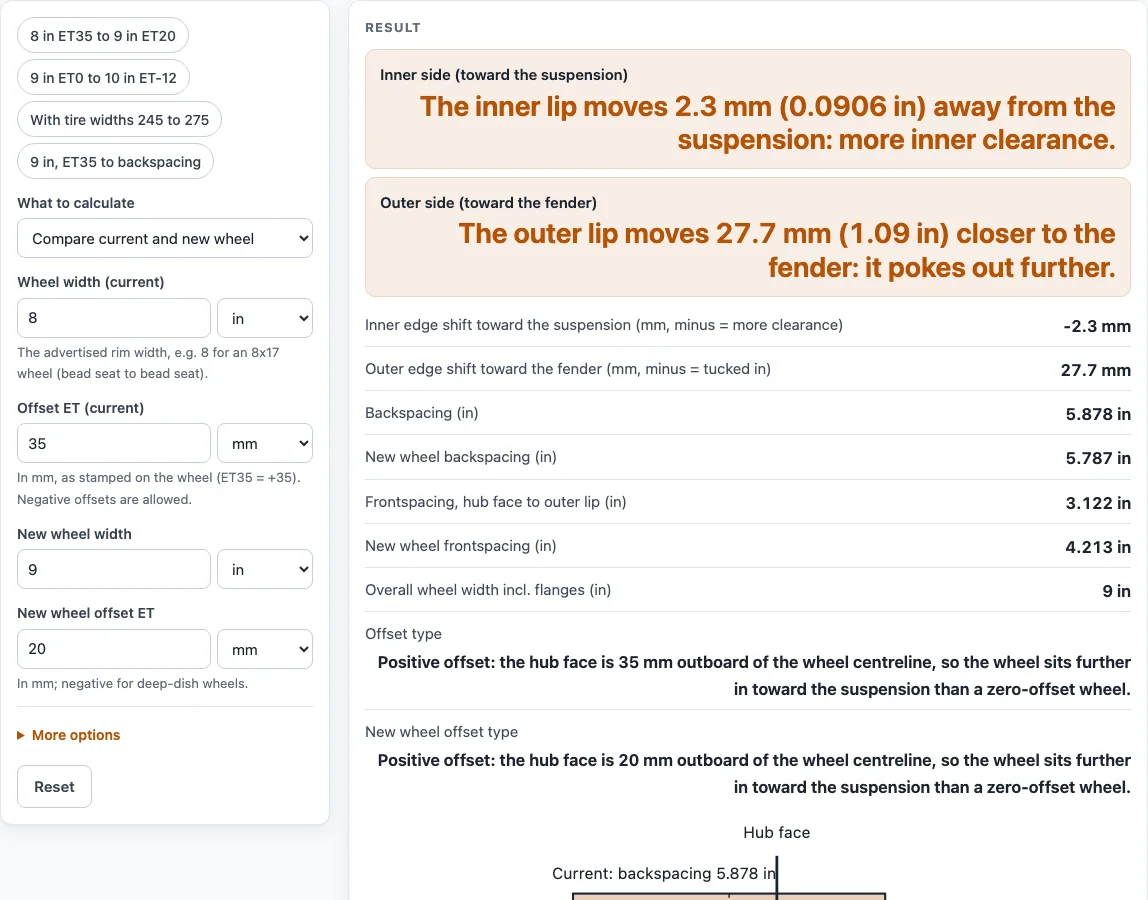
Changing an 8 in ET35 wheel to a 9 in ET20 moves the inner lip 2.3 mm away from the suspension, which gives more inner clearance. The outer lip moves 27.7 mm (1.09 in) closer to the fender, so it sits further out.
If you add tire section widths, the calculator also shows how far the sidewalls move. A 245 mm tire on ET35 changing to 275 mm on ET20 keeps its inner sidewall in place and moves its outer sidewall 30 mm outward.
Sources
Checked October 2026:
- Offset (ET), backspacing and positive/negative offset definitions: Wikipedia, Wheel sizing; Valor Offroad, wheel offset vs backspacing
- Overall width about 1 in more than the rim width (about 0.5 in per flange): Variant Wheels, what is wheel backspacing — editable, because makers differ
- The tire is assumed to sit centred on the wheel; 1 in = 25.4 mm (NIST SP 811)
For estimation; verify critical designs against the applicable standard.
Worked examples
| Input | Result |
|---|---|
| 8 in wide ET+35 → 9 in ET+20 | The inner lip moves 2.3 mm (0.0906 in) away from the suspension: more inner clearance. The outer lip moves 27.7 mm (1.09 in) closer to the fender: it pokes out further. |
| 9 in wide ET0 → 10 in ET−12 | The inner lip moves 0.7 mm (0.0276 in) closer to the suspension: less inner clearance. The outer lip moves 24.7 mm (0.972 in) closer to the fender: it pokes out further. |
| 8.5 in wide ET+35 → 9.5 in ET+30 | The inner lip moves 7.7 mm (0.303 in) closer to the suspension: less inner clearance. The outer lip moves 17.7 mm (0.697 in) closer to the fender: it pokes out further. |
| 9 in wide, ET+35 mm | backspacing 6.378 in (162 mm) |
| 9 in wide, 6.5 in backspacing | offset +38.1 mm |
Calculated by the tool above with these values.
Frequently asked questions
Does this check brake caliper, strut, fender or tire bulge clearance?
No. The results show positions only. Check brake, strut, fender and tire clearance on the vehicle.
Why does the calculator show a warning?
The warning appears when the offset is larger than half the overall width. In that case the hub face would sit outside the wheel, which is usually not a valid fit.
Can I enter widths and offsets in millimetres, and can offsets be negative?
Yes. Widths and offsets can be typed in inches or millimetres, and each quantity has its own unit menu. Negative offsets are allowed.
What does the flange allowance change?
It sets how much is added to the rim width to get the overall width. The default is 1 in. You can change it under More options. If your wheel data excludes the flanges, enter that allowance so your numbers match.
Can I use the results in commercial projects or client reports?
Yes. You can use them in quotes, design notes, reports and client work without attribution. Treat them as estimates.
Is the calculator free, and is anything I type uploaded?
It is free, and nothing you type is uploaded. Calculations run in your browser, and no account is needed.
Can I print or share a calculation?
Yes. Print or save it as a one-page PDF, or copy a link that reopens the same inputs.
Related tools
- Tire size calculator: use it to check the overall diameter of a tire before you work out how it fits a wheel.
- Tire size comparison: use it to compare two tire sizes side by side when you change tire size.
- Axle ratio calculator: use it to see how a gearing change affects engine speed at a given road speed.
- Bearing size chart: use it to look up bearing dimensions when you check hub or axle parts.
- Torque calculator: use it to work through torque figures for drivetrain calculations.
- All power transmission calculators: use it to browse every calculator on the site.