Tire Size Comparison Calculator
Enter your original tire size and one or two new sizes to compare diameter, width, sidewall and revolutions per mile, and see the speedometer error.
How to use the Tire Size Comparison Calculator
- Enter your original tire size. Metric (265/70R17), flotation (33x12.50R15) and plain diameter entries all work.
- Enter one or two new sizes to compare against the original.
- Open More options to choose mph or km/h as the speed unit.
- Enter the speedometer reading to see the real speed with each new size. A table lists real speeds for other readings, from 30 to 80 mph or 50 to 130 km/h.
- Read the side-by-side results. They show the difference in overall diameter, section width, sidewall height, circumference and revolutions per mile and per kilometre, both as an absolute change and as a percentage.
- Open “How it was calculated” under the result to see the formula, the values substituted and the answer with units.
- Watch for the warning. It appears if a new size differs from the original diameter by more than 3%.
- Tap a preset button above the form to load a typical case, such as 265/70R17 to 285/75R17. Use “Reset” to return to the starting example.
The result updates as you type, so there is no button to press first. “Copy result” copies the result lines with a link. “Copy link” copies the page address, which stores every input, so the same calculation reopens later or can be sent to a colleague. “Print / save as PDF” prints a one-page record with the inputs, results, calculation steps and date.
Tire size comparison guide: how do you compare two tire sizes?
Start with overall diameter, because it drives most of the other results. A size such as 265/70R17 has three parts: 265 is the section width in millimetres, 70 is the sidewall height as a percentage of the width, and R17 is the rim diameter in inches.
How is a tire’s overall diameter calculated?
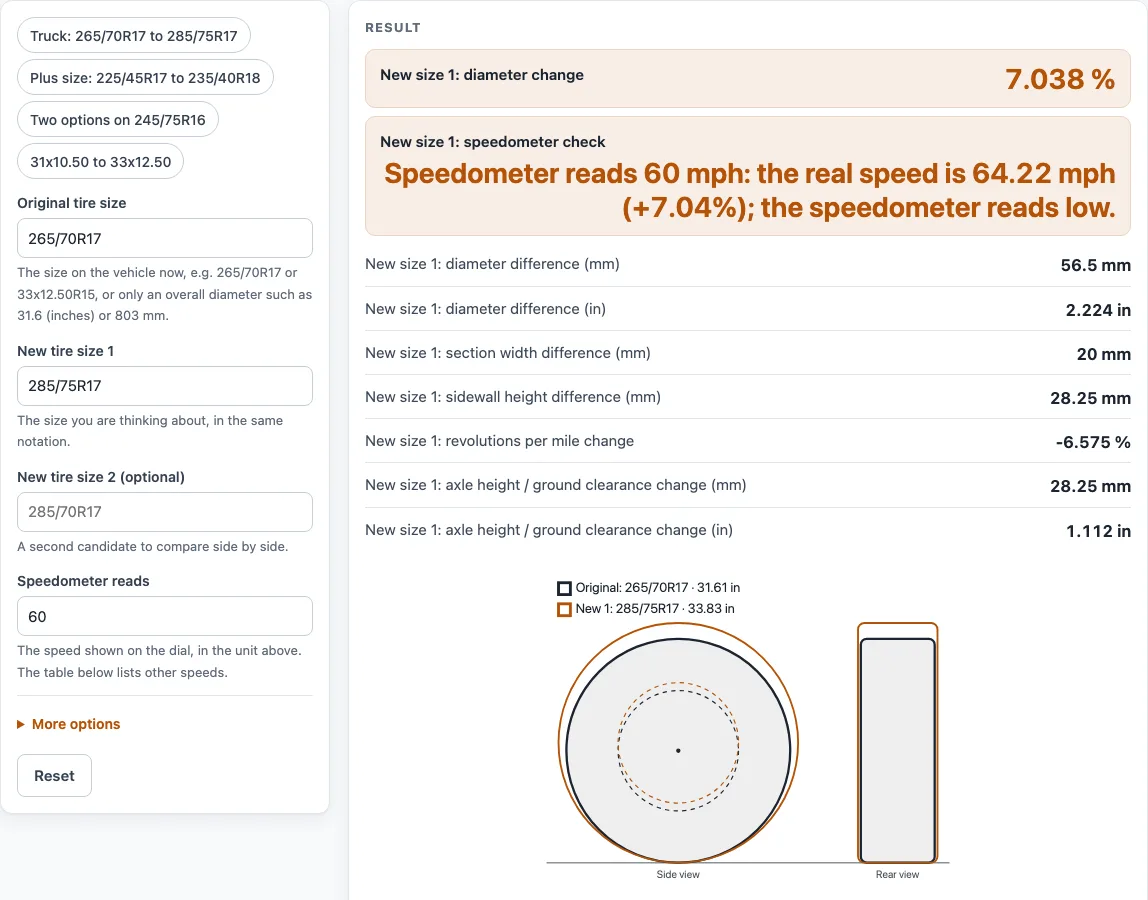
Overall diameter equals twice the sidewall height plus the rim diameter. For 265/70R17, the sidewall is 265 × 0.70 = 185.5 mm. Twice that is 371 mm, and the 17-inch rim adds 431.8 mm, for a total of 802.8 mm (31.61 in). For 285/75R17, the sidewall is 213.75 mm, so the total is 427.5 + 431.8 = 859.3 mm (33.83 in). That is a change of +56.5 mm, or +7.04%.
Half of that diameter change, 28.25 mm, is how far the axle, and anything hung under it, sits higher.
What does a larger diameter do to the speedometer?
A speedometer works by counting wheel rotations. A larger tire turns fewer times per mile, so the vehicle covers more ground than the display shows. The formula is:
Real speed = indicated speed × D_new ÷ D_old
The percentage error equals the diameter change. With 285/75R17, a speedometer reading of 60 mph means 60 × 859.3 ÷ 802.8 = 64.22 mph real, so the speedometer reads low by 7.04%. The same percentage applies in km/h, so the error is the same in either unit. This assumes the speedometer was calibrated for the original size and counts wheel rotations. Sizes are nominal geometric values, not measured tire dimensions.
Circumference is π × diameter, so the 285/75R17 grows the circumference by 177.5 mm. Revolutions per mile fall from 638.1 to 596.1, a change of −6.58%.
Why does a 3% diameter change matter?
A tire maker’s plus-sizing guide describes staying within 3% of the original diameter as the safest route when plus sizing, and the calculator shows a warning above that figure. A small change keeps the speedometer error small. For example, 225/45R17 to 235/40R18 changes the diameter from 634.3 mm to 645.2 mm, or +1.72%. At an indicated 100 km/h, the real speed is 101.7 km/h.
How do width and sidewall height change in a comparison?
Section width is the first number in the size, and sidewall height is the width multiplied by the aspect ratio. In the 265/70R17 to 285/75R17 example, the new tire is 20 mm wider and has a sidewall 28.25 mm taller. Those figures show the change in each part, but they do not show whether the tire fits. Ground-clearance figures do not include suspension travel or fender, strut and steering clearance, so check those on the vehicle.
Sources
Checked October 2026:
- Tire size formats: Wikipedia, Tire code; Yokohama, sizing information
- “Staying within the 3% variance is the safest route when plus sizing”: Lionhart Tires, plus sizing tires (a tire maker’s guide, not a regulation)
- Real speed = indicated × new diameter ÷ old diameter assumes the speedometer counts wheel turns and was set for the original size; 1 in = 25.4 mm (NIST SP 811)
For estimation; verify critical designs against the applicable standard.
Worked examples
| Input | Result |
|---|---|
| 265/70R17 → 285/75R17 | diameter +7.04%, speedometer 60 mph = 64.22 mph actual |
| 225/45R17 → 235/40R18 | diameter +1.72%, speedometer 100 km/h = 101.7 km/h actual |
| 245/75R16 → 265/70R17, 285/70R17 | diameter +3.73%, speedometer 65 mph = 67.43 mph actual |
| 205/55R16 → 205/50R17, 215/45R17 | diameter +0.775%, speedometer 120 km/h = 120.9 km/h actual |
| 31x10.50R15 → 33x12.50R15 | diameter +6.45%, speedometer 55 mph = 58.55 mph actual |
Calculated by the tool above with these values.
Frequently asked questions
Can I use the results in commercial projects or client reports?
Yes. Results may be used in commercial work, such as quotes, design notes, reports and client projects, without attribution. The tool does not certify that a size fits or is approved for a vehicle.
Is the calculator free, and is anything I type uploaded?
Yes, the calculator is free, and there is no account or sign-up. Everything is calculated in your browser, and nothing you type is uploaded.
Can I print or share a calculation?
Yes. “Print / save as PDF” produces a one-page record with the inputs, results, calculation steps and date. “Copy link” copies a page address that stores every input, so the calculation reopens later or can be sent to a colleague.
Does the tool accept flotation sizes and plain diameters?
Yes. It reads metric sizes such as 265/70R17, flotation sizes such as 33x12.50R15, and plain diameter entries. Where a size has no width or sidewall, that value shows as a dash.
Can I compare a metric size with an inch size?
Yes. Each size box reads metric sizes, flotation (inch) sizes and plain diameters, so you can compare 265/75R16 with 31x10.50R15, or type a diameter such as 800 mm.
Is the speedometer error the same in mph and km/h?
Yes. The percentage error equals the diameter change, and that percentage is the same in any unit. The same applies to the 60 mph example, which is a 7.04% error, as it is in km/h.
Does a comparison replace checking clearance on the vehicle?
No. The results assume the speedometer counts wheel rotations and was calibrated for the original size. Ground-clearance figures also exclude suspension travel and fender, strut and steering clearance, so check those on the vehicle.
Related tools
- Tire size calculator: Use it to work out the dimensions of a single tire size before you compare two.
- Axle ratio calculator: Use it when a larger tire changes the effective gearing and you want to check the axle ratio.
- Wheel offset calculator: Use it when a new wheel or tire combination changes how the wheel sits in the wheel well.
- Gear ratio calculator: Use it to work out gear ratios for a drivetrain.
- Torque calculator: Use it to estimate torque figures for a drivetrain.
- All power transmission calculators: Use it to browse every calculator on the site.