Tire Size Calculator
Type a tire size such as 285/75R16 or 33x12.50R15 to get its diameter, sidewall height, revolutions per mile and the metric or inch equivalent.
The Tire Size Calculator is a free, browser-based tool that reads one tire size and returns its section width, sidewall height, overall diameter, circumference, revolutions per mile and per kilometre, and rim diameter. Enter a metric size such as 285/75R16, a flotation size such as 33x12.50R15, or a plain overall diameter in inches or mm, and the results appear as you type.
It also works as a tire diameter calculator and a tire size converter. A metric size is shown with its inch equivalent, and a flotation size is shown with its metric equivalent. Use it to compare a current tire with a possible replacement, or to check how far a tire travels per turn. Nothing is uploaded, and no account is needed.
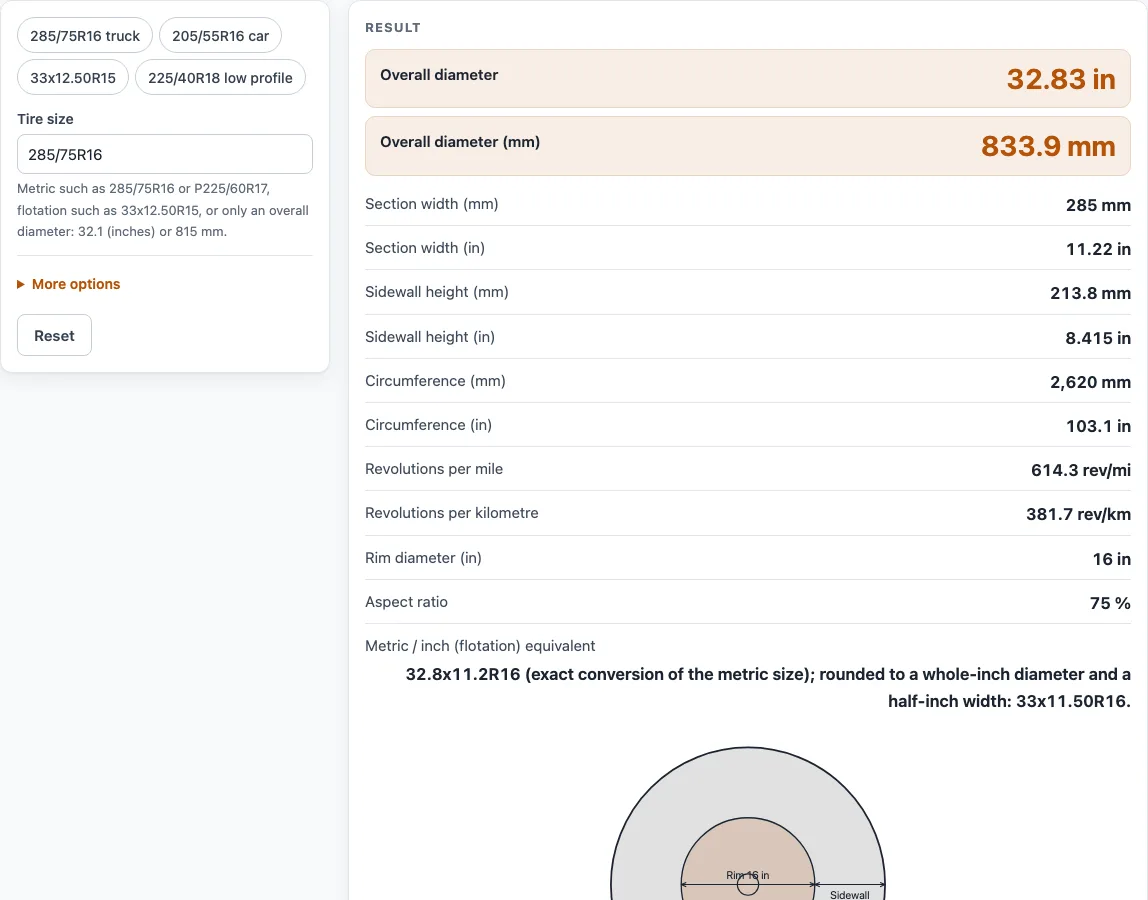
How to use the Tire Size Calculator
- Click the size box and type your tire size, such as 285/75R16 or LT265/70R17. You can also type a plain overall diameter, such as 33 in or 800 mm, if you only know the height of the tire.
- Results are shown in both inches and millimetres. Open More options to choose in or mm for the table of neighbouring sizes further down.
- Read the results. They update as you type and show section width, sidewall height, overall diameter, circumference, revolutions per mile and per kilometre, and rim diameter.
- Open ‘How it was calculated’ under the result to see the formula, the values substituted, and the answer with units.
- Scroll to the table of neighbouring sizes to compare tires on the same rim. It works like a small tire dimension chart: each row is a width and aspect ratio around your size, with its overall diameter, so you can see which sizes stay close to your current height.
- Use the preset buttons above the form to load typical cases (a 285/75R16 truck tire, a 205/55R16 car tire, 33x12.50R15 and 225/40R18), and press ‘Reset’ to return to the starting example.
Under the result, ‘Copy result’ copies the result lines with a link, ‘Copy link’ copies the page address, and ‘Print / save as PDF’ prints a one-page record. Details are in the sections below.
How do you read a tire size like 285/75R16?
A metric tire size has three numbers. The first is the section width in millimetres, the second is the sidewall height as a percentage of that width, and the last is the rim diameter in inches. In 285/75R16, the tire is 285 mm wide, its sidewall is 75% of that width, and it fits a 16-inch rim.
The letter R stands for radial construction. An optional prefix comes before the width. P means passenger, LT means light truck, ST means special trailer, and T means temporary spare. The prefix tells you the tire class, but it does not change the diameter formula.
A flotation size such as 33x12.50R15 works differently. Its first number is the overall diameter in inches, the second is the width in inches, and the last is the rim diameter in inches.
How is the overall diameter of a tire calculated?
The overall diameter equals the rim diameter plus twice the sidewall height. The sidewall height equals the width multiplied by the aspect ratio, divided by 100.
For 285/75R16, the sidewall is 285 × 0.75 = 213.75 mm. The overall diameter is D = 2 × 213.75 + 16 × 25.4 = 833.9 mm, or 32.83 in. The circumference is 2,619.8 mm (103.1 in). Revolutions per mile equal 63,360 in ÷ (π × D in), which gives 614.3.
For 205/55R16, the diameter is 631.9 mm, or 24.88 in, and the tire turns 810.7 times per mile.
How does tire size conversion work between metric and inch sizes?
A metric size is converted to inches by working out its real diameter and width, then expressing them in inch units. For 285/75R16, the equivalent is 32.8x11.2R16. Rounded to a whole-inch diameter and a half-inch width, it reads 33x11.50R16.
The tool also converts in the other direction. The flotation size 33x12.50R15 has a diameter of 838.2 mm and a width of 317.5 mm, with a sidewall of 228.6 mm (9.00 in). It converts to 320/70R15, which is 829 mm tall, or 1.1% shorter than 33 in.
The metric result is rounded to a 5 mm width and a 5% aspect ratio. The page shows the real diameter and the percentage difference, so you can see how close the match is. This rounding is a display choice, not a published standard.
Sources
Checked October 2026:
- Metric size format (width / aspect ratio R rim), flotation format and the P, LT, ST, T prefixes: Wikipedia, Tire code; Yokohama, sizing information
- 1 in = 25.4 mm and 63,360 in per mile: NIST SP 811
- Diameters are geometric (unloaded, new); a maker’s published revolutions per mile can differ by a few percent
For estimation; verify critical designs against the applicable standard.
Worked examples
| Input | Result |
|---|---|
| 285/75R16 | 32.83 in (833.9 mm) overall diameter, 614.3 rev/mi |
| 205/55R16 | 24.88 in (631.9 mm) overall diameter, 810.7 rev/mi |
| 33x12.50R15 | 33 in (838.2 mm) overall diameter, 611.2 rev/mi |
| LT265/70R17 | 31.61 in (802.8 mm) overall diameter, 638.1 rev/mi |
| 225/40R18 | 25.09 in (637.2 mm) overall diameter, 803.9 rev/mi |
Calculated by the tool above with these values.
Frequently asked questions
Is the calculator free, and is anything I type uploaded?
Yes, the calculator is free. Every calculation runs in your browser, so nothing you type is uploaded. There is no account or sign-up.
Can I use the results in commercial projects or client reports?
Yes. You may use the results in commercial work, including quotes, design notes, reports, and client projects, without attribution. The tool does not certify that a size fits or is approved for a vehicle.
Can I print or share a calculation?
Yes, in two ways. ‘Print / save as PDF’ produces a one-page record with the inputs, results, calculation steps, and date. ‘Copy link’ copies the page address, which stores every input in the ?s= part of the URL. Anyone who opens that link, including a colleague, sees the same calculation. ‘Copy result’ copies the result lines together with a link.
Why does the diameter on a tire’s spec sheet differ slightly from the result?
The calculator shows nominal geometric sizes, unloaded and without wear. A maker’s published diameter and revolutions per mile can differ by a few percent.
Does the Tire Size Calculator confirm that a tire is legal or safe for my vehicle?
No. It calculates geometry from the size you enter. Check the vehicle maker’s approved sizes and load ratings, and ask a tire professional before you change size.
Is this the same as a tyre size calculator?
Yes. Tyre is the British spelling and pneu the French word; the calculation is identical. This online tool is also searched for as a tire dimension calculator, tire measurement calculator, tire profile calculator, tire size estimator, tire size finder or tire size translation (and typed in short as tire dia calc, wheel size calc or tire measure converter), and its metric and inch equivalent works as a tyre conversion table for one size. For figuring tire size from the sidewall code, use the steps above. To determine the tire radius, halve the overall diameter.
What does the LT, ST, P, or T prefix change in the results?
The prefix tells you the tire class: P for passenger, LT for light truck, ST for special trailer, and T for temporary spare. It does not change the diameter formula. LT265/70R17 gives 31.61 in (802.8 mm) and 638.1 revolutions per mile.
What does revolutions per mile tell me?
It is the number of turns a tire makes over one mile. A tire with a larger overall diameter turns fewer times per mile. For 225/40R18, the result is 803.9 revolutions per mile.
Related tools
- Tire size comparison: Use it to put two tire sizes side by side when you are choosing between them.
- Wheel offset calculator: Use it when you are checking how a wheel’s mounting position affects fit.
- Axle ratio calculator: Use it when you are looking at how axle ratio works with a new tire diameter.
- Gear ratio calculator: Use it to work out the gear ratio of a drivetrain.
- Gearbox calculator: Use it to analyse gearbox ratios and speeds.
- All power transmission calculators: Use it to browse every calculator on the site.