Bicycle Gear Calculator
Enter your chainrings, cassette, wheel size and cadence to see the gear ratio, gear inches and speed of every gear.
The bicycle gear calculator works out the gear ratio, gear inches and speed for every chainring and cassette cog combination on a bike. Enter your chainring teeth, cassette cogs, wheel size, tire width and pedalling cadence, and the results update as you type. It runs entirely in your browser, is free, and needs no account or sign-up.
Call it a bike or cycle gear calculator (or cycle gear ratio calculator): it handles road, gravel, mountain, single speed and kids’ bikes, and you can mix metric and US customary units. The results show your lowest and highest gear, their speeds, and the gear range, so you can compare options before buying a new chainring or cassette, or check how fast a gear will take you at a given pedalling speed.
How to use the Bicycle Gear Calculator
- Enter the chainring teeth. Type one to three numbers, such as 50 and 34 for a double chainring, or 34 for a single.
- Enter the cassette cogs. Type an exact list such as 11,12,13,15,17,19,21,24,28,32, or a range such as 11-34. For a range, open More options and set the number of speeds. In-between cogs are estimated and a warning says so.
- Choose the wheel size. Sizes are listed by ETRTO bead seat diameter, so 700c and 29-inch bikes both use 622 mm.
- Enter the tire width in mm or inches, for example 28 mm for a 700x28c tire or 2.4 in for a mountain tire.
- Set the cadence in rpm. The default is 90 rpm.
- Check the unit menu next to each quantity. The tool converts mixed units before it calculates.
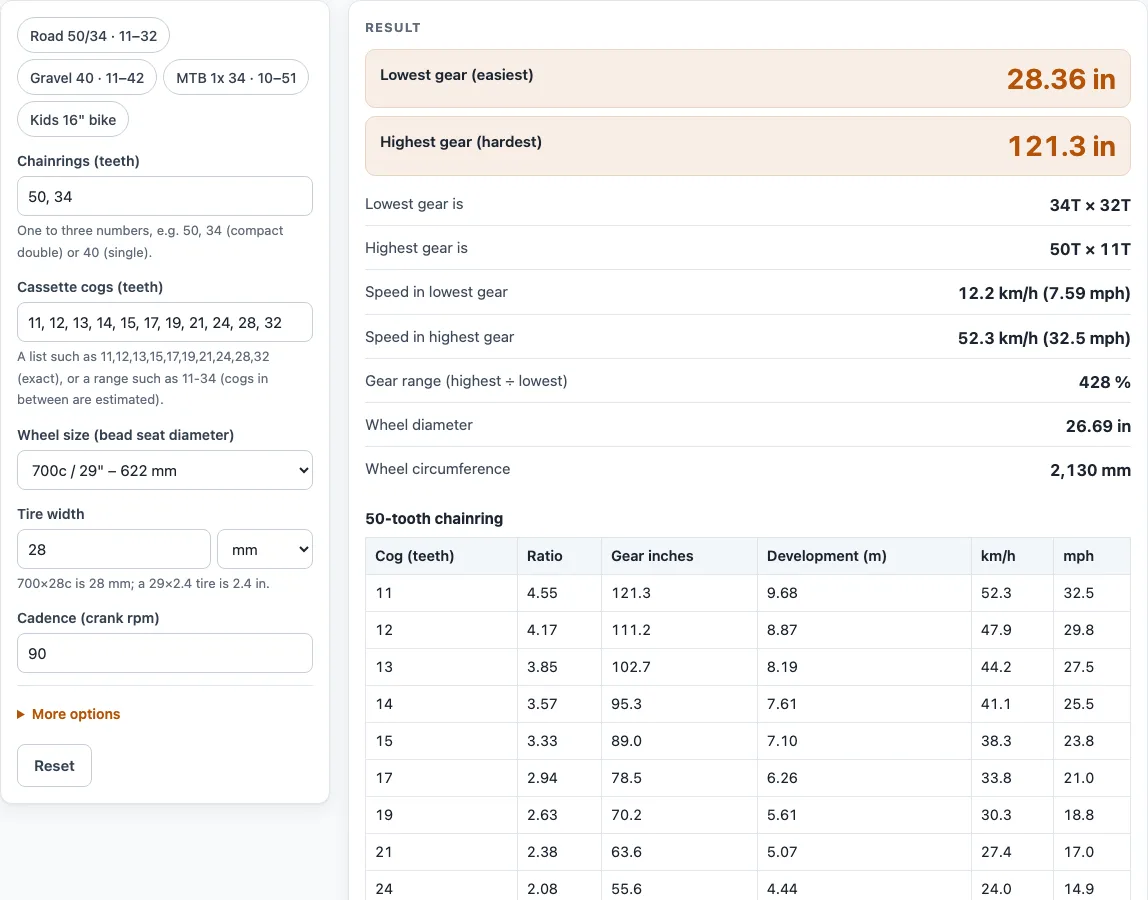
- Read the results: the lowest and highest gear in gear inches, the chainring and cog for each, their speeds, the gear range in percent, and the wheel diameter and circumference. Scroll down for the table for each chainring and the dot chart.
- Read any warnings, such as an approximate wheel circumference or duplicate ratios between chainrings.
Presets load road, gravel, 1x MTB and kids’ setups. Copy link keeps every input in the page address, and Print / save as PDF gives a dated record.
How do you calculate gear inches?
Gear inches are the gear ratio multiplied by the wheel diameter in inches, with the tire included. The gear ratio is chainring teeth divided by cog teeth, so a larger number means a harder gear.
Take the default setup: a 50-tooth chainring, an 11-tooth cog, and a 700c wheel with a 28 mm tire. The wheel diameter is 622 + 2 × 28 = 678 mm, which is 26.69 inches. The ratio is 50 ÷ 11 = 4.545, so the gear is 4.545 × 26.69 = 121.3 gear inches. The easiest gear, a 34-tooth chainring with a 32-tooth cog, gives 34 ÷ 32 = 1.0625 × 26.69 = 28.4 gear inches. Dividing the highest by the lowest gives the gear range: 121.3 ÷ 28.4 = 4.28, or 428%.
The tool uses an approximation for the wheel. Rolling diameter is the bead seat diameter plus twice the tire width, and circumference is pi times that diameter. A real tire is usually a few millimetres smaller, so treat the figures as estimates.
How do you work out bike speed from gear ratio?
Speed comes from development, the distance the bike travels for each full turn of the cranks. Development is the gear ratio multiplied by the wheel circumference in metres. Speed in km/h is then development × cadence × 60 ÷ 1000, and mph is km/h ÷ 1.609344.
For the default highest gear, the circumference is pi × 678 mm = 2,130 mm, or 2.130 m. Development is 4.545 × 2.130 = 9.68 m per crank turn. At 90 rpm, the speed is 9.68 × 90 × 60 ÷ 1000 = 52.3 km/h, or 32.5 mph. The lowest gear gives 1.0625 × 2.130 = 2.26 m per turn and 12.2 km/h at the same cadence.
Cadence changes speed in direct proportion. Doubling the pedalling rate doubles the speed, so the same gear feels very different at 60 rpm and at 100 rpm.
Worked examples
| Input | Result |
|---|---|
| 50/34T chainrings, 11–32T cassette (11 cogs), 678 mm wheel, 90 rpm | 28.4–121 gear inches, 12.2–52.3 km/h |
| 48/32T chainrings, 11–34T cassette (11 cogs), 686 mm wheel, 85 rpm | 25.4–118 gear inches, 10.3–48 km/h |
| 34T chainring, 10–51T cassette (12 cogs), 743.9 mm wheel, 80 rpm | 19.5–99.6 gear inches, 7.48–38.1 km/h |
| 40T chainring, 11–36T cassette (10 cogs), 690.7 mm wheel, 75 rpm | 30.2–98.9 gear inches, 10.8–35.5 km/h |
| 44T chainring, 14–24T cassette (5 cogs), 379 mm wheel, 60 rpm | 27.4–46.9 gear inches, 7.86–13.5 km/h |
Calculated by the tool above with these values.
Frequently asked questions
Can I use the results in commercial projects or client reports?
Yes. You can use results in commercial work, including quotes, design notes, reports and client projects, without attribution. The tool does not certify compliance with any code, so verify critical designs against the applicable standard.
Is the calculator free, and is anything I type uploaded?
The calculator is free and needs no account or sign-up. Everything is calculated in your browser, and nothing you type is uploaded.
Can I print or share a calculation?
Yes. Print / save as PDF creates a one-page record with your inputs, results, calculation steps and the date. Copy link stores all your inputs in the page address, so anyone who opens that link sees the same calculation.
Why does the tool say the wheel circumference is approximate?
The circumference is calculated from the bead seat diameter plus twice the tire width, which is a standard approximation. A real tire is usually a few millimetres smaller, so measured speeds can differ slightly from the figures shown.
What do the warnings mean?
Warnings flag inputs that may need checking. They appear for estimated cogs when a range is typed, chainrings outside 20 to 70 teeth, cogs outside 9 to 52 teeth, tire widths outside 18 to 250 mm, cadence outside 30 to 160 rpm, and duplicate ratios between chainrings.
What is the gear range?
The gear range is the highest gear in gear inches divided by the lowest, shown as a percentage. The default setup gives 121.3 ÷ 28.4, which is 428%. A larger figure means a wider spread between your easiest and hardest gears.
Related tools
- Gear Ratio Calculator and Gear Ratio Finder — use it to find the ratio for a pair of gears when you do not need the full cassette table.
- Chain Length Calculator — use it when a new chainring or cassette changes the chain you need.
- Spur Gear Calculator — use it to size and check a pair of spur gears outside bicycle drivetrains.
- Planetary Gear Ratio Calculator — use it to work out ratios for planetary gear sets.
- Axle Ratio Calculator — use it to compare final drive ratios for vehicle axles.
- All power transmission calculators — use it to browse every calculator on the site.
Sources
Bead seat diameters per ISO 5775 / ETRTO as tabulated by Sheldon Brown (sheldonbrown.com/tire-sizing.html); gear inches and development per Sheldon Brown’s gear definitions. For estimation; verify critical designs against the applicable standard.