Bearing Size Chart
Type a bearing number such as 6203-2RS to get its bore, outside diameter and width, or find the bearings that fit a shaft size.
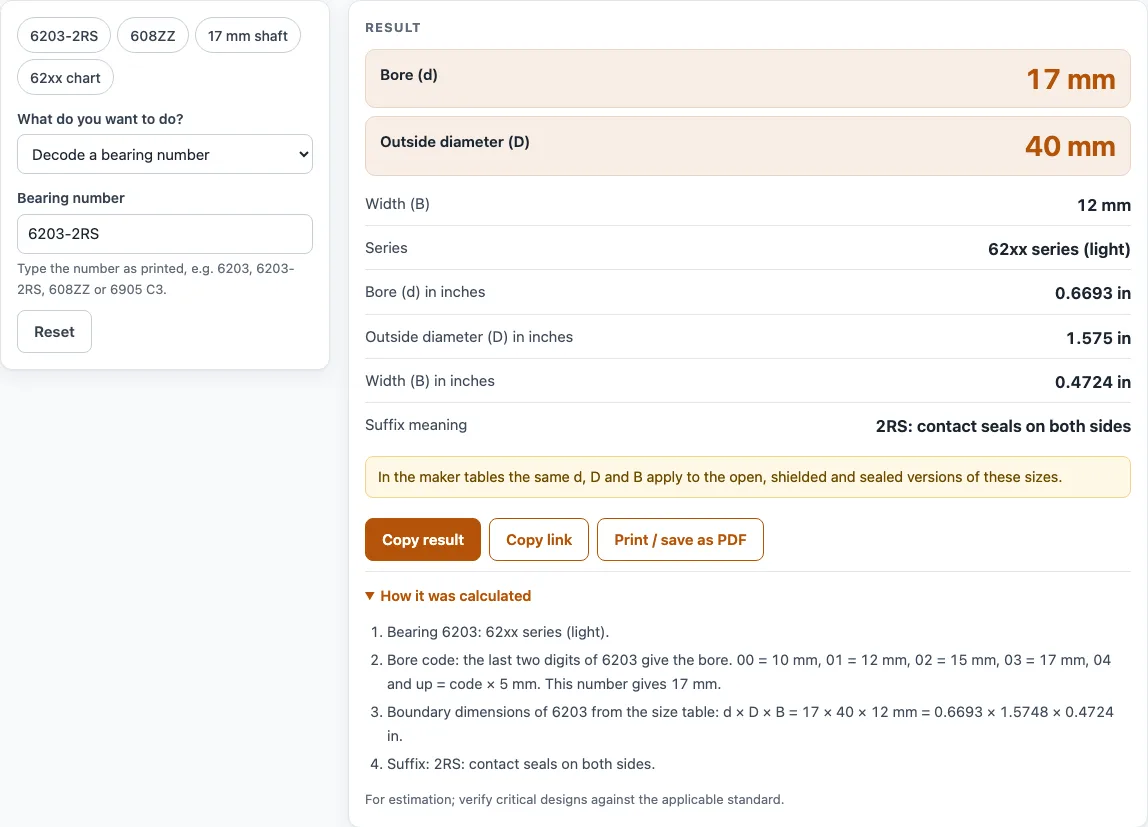
How to use the Bearing Size Chart
Type a bearing number, such as 6203-2RS. The bore (d), outside diameter (D) and width (B) appear in mm and inches, and the result updates as you type.
Open “How it was calculated” under the result to see the formula, the values substituted and the answer with units.
To search by size, choose “Find a bearing by size” and enter the shaft (bore) diameter, plus the outside diameter and width if you know them. A bore of 25 mm and an outside diameter of 52 mm return one match: 6205.
To list a whole series, choose “Show the size chart” and pick a series, such as 63. The tool lists 21 sizes. In the size search, each result lists the matching number with all three dimensions, and the size chart view prints the whole series as one clear table.
In the size search, choose mm or inches for each size from its unit menu; the tool converts them before it searches.
Preset buttons above the form load typical cases (6203-2RS, 608ZZ, a 17 mm shaft, the 62xx chart), and Reset restores the starting example.
The buttons under the result are Copy result, Copy link and Print / save as PDF.
How do bearing numbers work?
A deep groove ball bearing number is a code. The last two digits give the bore code, and the digits before them give the series. The series sets the outside diameter and width for a given bore. Series 62 is a light series, 63 is heavier and 60 is narrower. At a 17 mm bore, 6003 is 35 × 10 mm, 6203 is 40 × 12 mm and 6303 is 47 × 14 mm (D × B).
For bore codes 00 to 03 the bore is fixed: 00 is 10 mm, 01 is 12 mm, 02 is 15 mm and 03 is 17 mm. From 04 upward, the bore is the code multiplied by 5 mm, so 6204 has a 20 mm bore and 6220 has a 100 mm bore. Miniature numbers with a single digit give the bore directly, so 608 has an 8 mm bore; the 608 bearing size is 8 × 22 × 7 mm.
Some numbers describe the same bearing. 6900 and 61900 are one bearing (10 × 22 × 6 mm), because some makers write the 619 series with five digits. 68xx and 618xx are one series, and 160xx numbers are narrow versions of the 60 series. For example, 16004 is 20 × 42 × 8 mm, while 6004 is 20 × 42 × 12 mm.
How do I find a bearing by size?
Reverse lookup works because a bore and an outside diameter together usually identify one series and bore code. A 17 mm shaft fits six numbers: 6003, 6203, 6303, 6803, 6903 and 16003. Adding an outside diameter of 40 mm leaves only 6203. If you also know the width, enter it to narrow the list further, which helps when two series share a bore and outside diameter in other makers’ ranges.
Sources
Checked October 2026 (dimensions only; most rows checked in two or three catalogs):
- Timken, deep groove ball bearings catalog
- SKF, deep groove ball bearings section (PDF copy)
- NSK, deep groove ball bearings; NTN-SNR spot check (PDF)
- Inch values = mm ÷ 25.4
For estimation; verify critical designs against the applicable standard.
Worked examples
| Input | Result |
|---|---|
| bearing number 6203-2RS | 17 × 40 × 12 mm (d × D × B) |
| bearing number 608ZZ | 8 × 22 × 7 mm (d × D × B) |
| bearing number 6905-2RS C3 | 25 × 42 × 9 mm (d × D × B) |
| bore 25 mm, OD 52 mm | 1 match: 6205 |
| series 63 | 21 sizes listed |
Calculated by the tool above with these values.
Frequently asked questions
Can I use the results in commercial projects or client reports?
Yes. Results may be used in commercial work, including quotes, design notes, reports and client projects, without attribution. The tool is for estimation, and the page says so under each result: “For estimation; verify critical designs against the applicable standard.” The tool does not certify compliance with any code, so check critical designs against the standard that applies to your work.
Is the calculator free, and is anything I type uploaded?
Yes, the calculator is free, and nothing you type is uploaded. Every calculation runs in your browser, and there is no account or sign-up. Your inputs are stored only in the page address, and only when you use Copy link.
Can I print or share a calculation?
Yes. Print / save as PDF produces a one-page record with the inputs, the results, the calculation steps and the date. Copy link copies the page address, which holds every input, so the same calculation reopens later or can be sent to a colleague.
Why does the tool say a number is not in the table?
The table covers bores of 10–100 mm for the 60, 62, 63, 68, 69 and 160 series, and 3–9 mm for miniatures. For the 160 series, only 16002 to 16020 are included, because the makers number the other sizes differently. Check the number for typos first. If it is a valid bearing outside these series, it is not in this table.
Do shielded and sealed bearings have the same size?
Yes. Open, shielded and sealed versions of a size share the same bore, outside diameter and width. ZZ and 2Z mean metal shields on both sides, 2RS, 2RSH and 2RS1 mean rubber contact seals on both sides, and RZ is a low-friction non-contact seal.
What does C3 mean in a bearing number?
C3 means the internal clearance is larger than normal. C2 means it is smaller than normal, and C4 is larger than C3. The clearance suffix does not change the bore, outside diameter or width, so 6905-2RS C3 is 25 × 42 × 9 mm.
Why are some suffixes marked “not explained”?
The tool explains only the suffixes it covers. Codes such as P5, E, J and M show “not explained”, because suffix codes differ between makers. Check the maker’s catalog for those codes.
Related tools
- Bearing life calculator: use it when you need to estimate how long a bearing will last under a given load.
- Keyway calculator: use it to size the keyway that fits a shaft bore.
- Roller chain size chart: use it to look up pitch and dimensions for roller chain.
- Gearbox calculator: use it to work out gear ratios and output speeds.
- V-belt calculator: use it to check belt length and drive geometry.
- All power transmission calculators: use it to browse every calculator on the site.