Axle Ratio Calculator
Solve for speed, engine rpm, axle ratio or tire diameter, and see how a new tire size changes the effective ratio and the speedometer.
The Axle Ratio Calculator finds one missing value in the link between tire size, axle gearing and engine speed: vehicle speed, engine rpm, axle ratio or tire diameter. Choose the unknown in the Solve for select, enter the other three, and the result appears as you type. It runs in your browser, is free, and needs no account or sign-up.
Gearing sets how fast the engine turns at a given road speed. A taller tire or a numerically lower axle ratio lowers rpm at the same speed, while a shorter tire or a higher axle ratio raises it. It is also a tire height gear ratio calculator: people use it to check highway rpm before buying tires, to find the speedometer error after a tire change, or to pick an axle ratio for a target speed.
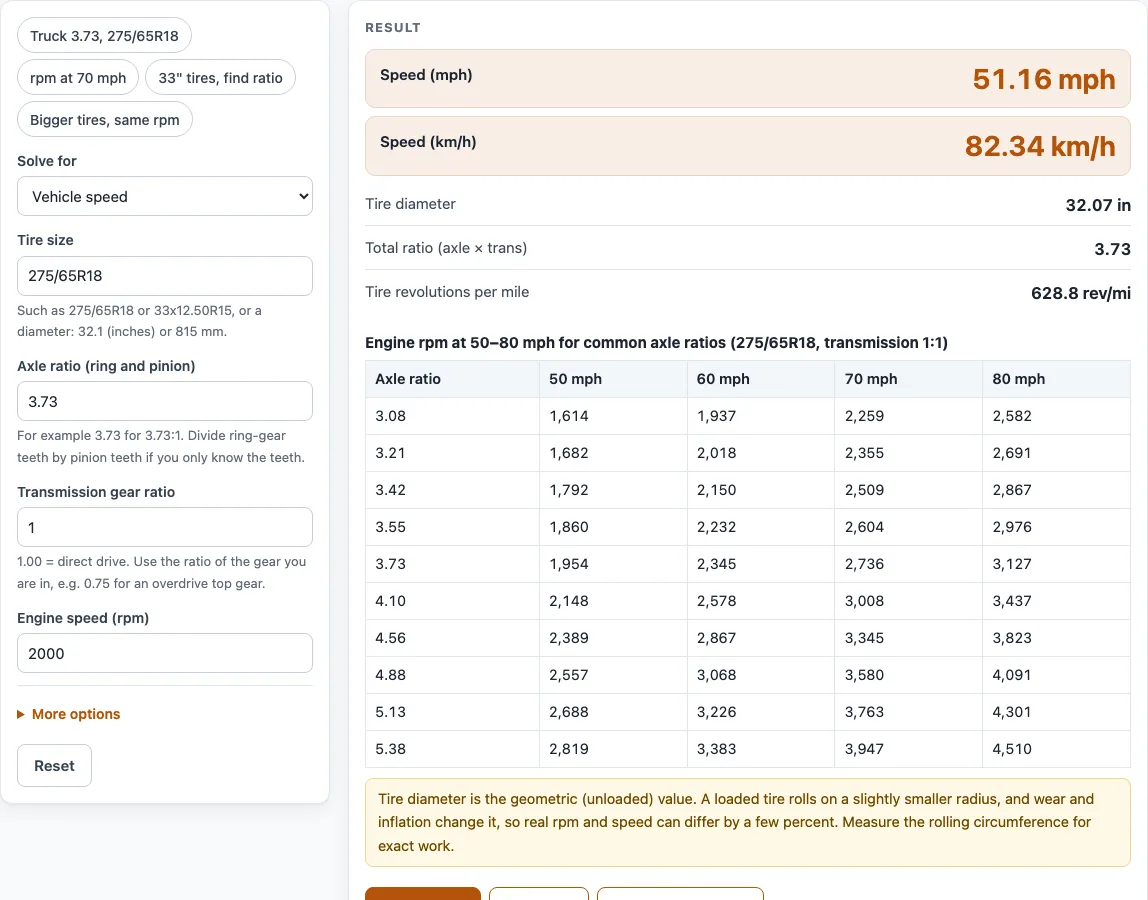
How to use the Axle Ratio Calculator
Set the Solve for select to the unknown you want: vehicle speed, engine rpm, axle ratio or tire diameter. The input field for that unknown is hidden, and the other fields stay open.
- In the tire size field, enter a metric size such as 275/65R18 (a P or LT prefix is allowed), a flotation size such as 33x12.50R15, or a plain diameter such as 32.1 (inches) or 815 mm.
- Enter the axle ratio, for example 3.73.
- Enter the transmission gear ratio. Use 1.00 for direct drive and about 0.75 for a typical overdrive.
- Enter the engine rpm and the vehicle speed. Pick mph or km/h from each quantity’s unit menu.
- Read the result. It updates as you type and shows the tire diameter in inches, the total ratio (axle x transmission) and the tire revolutions per mile.
- Open “How it was calculated” under the result to see the formula, the values substituted and the answer with units.
- To compare tires, open More options and enter a New tire size. You get the effective axle ratio, the engine rpm with the new tires at the same speed, and a speedometer check.
Presets load typical cases. Copy link keeps every input in the page address, and Print / save as PDF gives a dated record.
How do you calculate a diff ratio?
A differential (diff) ratio, also called the axle ratio, is the number of driveshaft turns needed to turn the wheels once. It equals the ring gear teeth divided by the pinion gear teeth. For example, 41 ring gear teeth and 11 pinion teeth give 3.727, usually written as 3.73.
If you already know the axle ratio, you do not need the tooth count. The tool uses the ratio directly, and it combines it with the transmission ratio to get the total ratio. Every engine revolution turns the wheels by 1 divided by the total ratio. A 3.73 axle in 1:1 direct drive means 3.73 engine turns per wheel turn.
How do you calculate a rear end ratio?
The rear end ratio is the axle ratio of the rear differential. To calculate speed from it, multiply the axle ratio by the transmission ratio and use the core formula:
mph = rpm x tire diameter (in) / (axle ratio x transmission ratio x 336.135)
The constant 336.135 comes from 63,360 inches per mile divided by (60 minutes per hour x pi). In metric, km/h = rpm x tire diameter (mm) / (total ratio x 5,305.16), where 5,305.16 = 1,000,000 mm per km / (60 x pi).
Rearranged, the formula gives the axle ratio needed for a target speed:
axle ratio = rpm x tire diameter (in) / (mph x transmission ratio x 336.135)
With a 33-inch tire, 2,800 rpm at 65 mph, and a 1:1 transmission, the result is 2,800 x 33 / (65 x 336.135) = 4.229:1.
How do you calculate a rear gear ratio?
The rear gear ratio is the same number as the axle ratio. Set Solve for to axle ratio, and the tool calculates it from the tire, speed, rpm and transmission ratio.
The tire diameter is the largest input to check. For a metric size, the diameter is 2 x section width x aspect ratio / 100 + rim diameter x 25.4 mm. For 275/65R18, that is 2 x 275 x 0.65 + 18 x 25.4 = 814.7 mm, or 32.07 inches. For a flotation size such as 33x12.50R15, the first number is already the diameter in inches.
This is the geometric diameter. A loaded tire is usually a few percent smaller, and the tool’s results are for estimation. Use the same method to solve rpm: rpm = mph x axle ratio x transmission ratio x 336.135 / tire diameter in inches.
Worked examples
| Input | Result |
|---|---|
| 275/65R18, 3.73:1 axle, 1:1 trans, 2,000 rpm | 51.16 mph |
| 265/70R17, 3.55:1 axle, 0.75:1 trans, 70 mph | 1,982 rpm |
| 33x12.50R15, 1:1 trans, 2,800 rpm, 65 mph | 4.229:1 axle ratio |
| 265/70R17, 3.73:1 axle, 1:1 trans, 2,400 rpm | 97.37 km/h |
| 4.1:1 axle, 1:1 trans, 2,500 rpm, 60 mph | 33.08 in tire (840.1 mm) |
Calculated by the tool above with these values.
Frequently asked questions
What does the Solve for select change?
It chooses which of the four values the calculator works out: vehicle speed, engine rpm, axle ratio or tire diameter. The field for the chosen value is hidden, and the other fields stay open for your inputs.
Why does my speedometer read differently from the calculated speed?
A larger or smaller tire changes the real speed for the same speedometer reading. For example, changing 265/70R17 to 285/75R17 makes the real speed 7.04% higher than the speedometer shows, and it turns a 3.73 axle into an effective 3.485:1. Enter a New tire size under More options to see this for your own tires.
Is the tire diameter exact for a loaded tire?
No. The tool uses the geometric diameter from the tire size, and a loaded tire is a few percent different. For a tire you are relying on, use the measured value from the manufacturer or a direct measurement.
What do the warnings mean?
They flag inputs outside the range the calculator is meant for, such as an axle ratio outside 1.5 to 8, a transmission ratio outside 0.3 to 8, rpm above 9,000, speed above 250 mph, or a tire diameter outside 10 to 80 inches. A new tire that changes speed by more than 3% also triggers a warning.
Can I use the results in commercial projects or client reports?
Yes. You can use the results in quotes, design notes, reports and client projects without attribution. The page states that results are for estimation, so verify critical designs against the applicable standard.
Does the calculator certify compliance with any code?
No. It does not certify compliance with any code or standard. It gives estimates from the formula, and the final check against the relevant standard is up to you.
Is the calculator free, and is anything I type uploaded?
The calculator is free, with no account or sign-up. Everything is calculated in your browser, and nothing you type is uploaded.
Can I print or share a calculation?
Yes. Print / save as PDF prints a one-page record with the inputs, results, calculation steps and date. Copy link copies a page address that stores every input, so the same calculation reopens for you or a colleague.
Related tools
- Gear Ratio Calculator and Gear Ratio Finder: use it to work with gear ratios in general, including the ratio of a gear pair.
- Bearing Life Calculator: use it to estimate how long a bearing lasts under a given load and speed.
- Belt Length Calculator: use it to find the belt length needed for a set of pulleys and a centre distance.
- Bicycle Gear Calculator: use it to compare gear inches and speeds for chainring and cassette combinations.
- Chain Length Calculator: use it to find the number of links for a chain running over two sprockets.
- Conveyor Belt Speed Calculator: use it to work out belt speed from pulley size and rotational speed.
- Gearbox Calculator: use it to check ratios and output speeds across a multi-stage gearbox.
- All power transmission calculators: use it to browse every calculator on the site.
Sources
Vehicle kinematics (Gillespie, Fundamentals of Vehicle Dynamics); tire size format per the ISO/ETRTO designation; 25.4 mm per inch and 63,360 in per mile are exact (NIST SP 811). For estimation; verify critical designs against the applicable standard.