Gear Ratio Calculator and Gear Ratio Finder
Enter the tooth counts of each gear pair to get the ratio, output speed and torque, or switch to the finder to get tooth counts for a ratio you need.
Popular tools
- Tire Speed Rating ChartRead a speed symbol or a full tire code, or enter your vehicle's top speed to find the lowest speed symbol that covers it.
- Axle Ratio CalculatorSolve for speed, engine rpm, axle ratio or tire diameter, and see how a new tire size changes the effective ratio and the speedometer.
- Bicycle Gear CalculatorEnter your chainrings, cassette, wheel size and cadence to see the gear ratio, gear inches and speed of every gear.
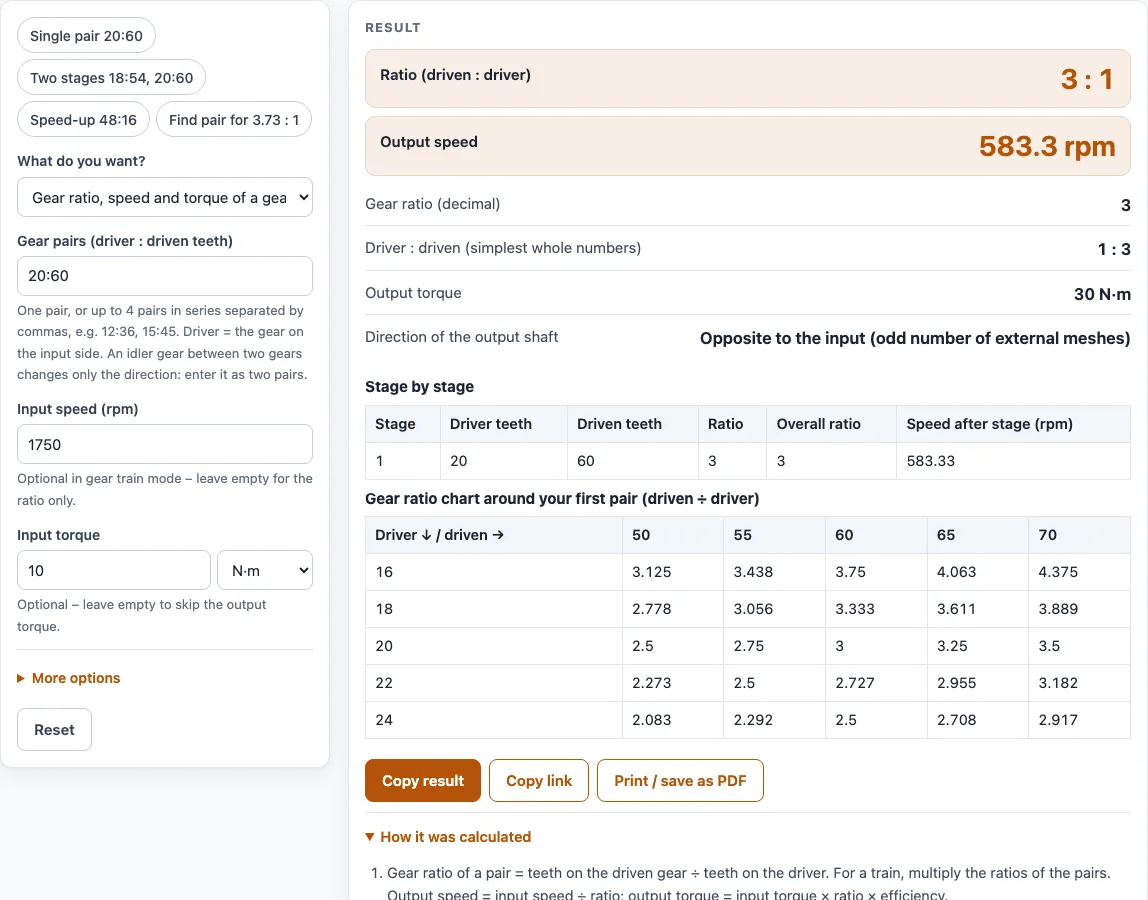
How to use the gear ratio calculator
- Under What do you want?, choose the gear train mode to check a set of tooth counts, or the find tooth counts mode to use the finder.
- In gear train mode, type driver:driven tooth counts for 1 to 4 pairs, separated by commas, for example
18:54, 20:60. The separators :, / and - are all accepted. - In finder mode, enter either a target ratio, or the input rpm and the wanted output rpm. Set the tooth range (default 12 to 100, maximum 200) and choose 1 or 2 stages.
- Optional: enter an input speed in rpm and an input torque. Pick the unit for each from its own unit menu, since metric and US customary units can be mixed.
- Optional: open More options to set efficiency per mesh (default 100 %).
- Read the result. It updates as you type, and How it was calculated shows the formula, the values used and the answer with units.
Use the preset buttons above the form to load typical cases, and Reset to return to the starting example. Copy result copies the result lines with a link, and Copy link copies a page address that stores every input, so the calculation can be reopened or sent to a colleague. Print / save as PDF creates a one-page record with the inputs, results, steps and date.
What is the formula for gear ratio?
The gear ratio of one pair is the driven teeth divided by the driver teeth. For a gear train with several pairs in series, the overall ratio is the product of the pair ratios. For example, 18:54 and 20:60 give 3 × 3 = 9, shown as 9 : 1. The calculator also shows the driver : driven ratio in the smallest whole numbers, so the same train reads as 1 : 9.
A ratio above 1 slows the output down. A ratio below 1 is a speed-up.
How do you calculate speed from gear ratios?
Calculating speed from gear ratios takes one division. Output speed equals input rpm divided by the ratio. With a 1750 rpm input through 20:60, the ratio is 3, so the output is 1750 ÷ 3 = 583.3 rpm. For 18:54 and 20:60, the ratio is 9, so the output is 194.4 rpm. The calculator also gives a stage-by-stage table showing the speed after each pair.
How do you calculate gear speed and torque?
Output torque equals input torque × ratio × efficiency raised to the number of meshes. Each mesh is one gear pair. With 10 N·m through 20:60 at 100 % efficiency, the output is 10 × 3 = 30 N·m. With 98 % efficiency per mesh, 10 N·m through 18:54 and 20:60 gives 10 × 9 × 0.98² = 86.44 N·m. Efficiency is 100 % by default, which means ideal gears, so real gearboxes will deliver somewhat less.
Which way does the output turn?
Each external gear mesh reverses the direction of rotation. An odd number of pairs reverses the output, and an even number keeps the input direction. An idler gear is entered as two pairs: 12:20, 20:36 gives the same ratio as 12:36, because the middle gear only changes direction.
How does the finder search for tooth counts?
The finder tries every combination of tooth counts within your range and ranks the results by how close each ratio is to the target. For a target of 3.73 : 1 with 12 to 60 teeth, it finds 15:56, a ratio of 3.7333 with an error of 0.0894 %. For a two-stage target of 1750 rpm to 60 rpm (29.17 : 1) with 12 to 80 teeth, it matches 12:75 plus 12:56 exactly. Equal ratios such as 12:36 and 20:60 are counted once, as the smallest pair in the range. If no pair falls within 1 % of the target, or the target is above the largest possible ratio, the finder says so.
Worked examples
| Input | Result |
|---|---|
| 20:60 | 3 : 1, 583.3 rpm, 30 N·m |
| 18:54, 20:60 | 9 : 1, 194.4 rpm, 86.44 N·m |
| 51:17 | 0.33333 : 1, 900 rpm, 33.33 ft·lbf |
| 3.73 : 1, 12–60 teeth | 15 : 56 (3.7333 : 1, 0.0894 %) |
| 1750 rpm → 60 rpm, 12–80 teeth | 12 : 75 + 12 : 56 (29.167 : 1, 0 %) |
Calculated by the tool above with these values.
Frequently asked questions
Is the gear ratio finder a separate tool?
No. It is the “find tooth counts” mode of the gear ratio calculator. Switch the mode at the top of the form to use it.
Why does the calculator warn about tooth counts below 17?
For a standard 20 degree gear, tooth counts below 17 (the limit is z = 2 / sin² α ≈ 17.1) can be undercut, which weakens the tooth. The warning tells you when a count falls below that limit.
Why does 12:36 appear only once when 20:60 has the same ratio?
The finder counts equal ratios once and lists the smallest pair in the range, so 12:36 and 20:60 both appear as 12:36.
Can I use the results in commercial projects or client reports?
Yes. Results may be used in commercial work, including quotes, design notes, reports and client projects, without attribution.
Is the calculator free, and is anything I type uploaded?
The calculator is free. Everything is calculated in your browser, and nothing you type is uploaded. There is no account or sign-up.
Can I print or share a calculation?
Yes. Print / save as PDF creates a one-page record with the inputs, results, calculation steps and date. Copy link copies a page address that stores your inputs, so the same calculation can be reopened later or sent to someone else.
Does the calculator certify a design as meeting a standard?
No. The result is for estimation. Verify critical designs against the applicable standard, because the tool does not certify compliance with any code.
Related tools
- Bicycle Gear Calculator: use it when you want gear speeds and ratios for a bike drivetrain.
- Axle Ratio Calculator: use it when you need the ratio of a vehicle’s final drive.
- Gearbox Calculator: use it when you are working with a complete gearbox rather than a single pair.
- Conveyor Belt Speed Calculator: use it when a drive’s output speed sets the speed of a conveyor.
- Belt Length Calculator: use it when a belt drive, rather than gears, transmits the motion.
- Chain Length Calculator: use it when a chain drive, rather than gears, transmits the motion.
- Bearing Life Calculator: use it to estimate how long the bearings supporting your gears will last.
- All power transmission calculators: use it to browse every calculator on the site.
Sources
Shigley’s Mechanical Engineering Design, ch. 13 (gear trains, undercut limit 2/sin²α); ISO 21771 terms. For estimation; verify critical designs against the applicable standard.